FAQ
To ensure you receive notifications confirming your password, In-store Training Plans, QCPP education, CPD education, iRewards bonus points and other offers, ensure you have 'Whitelisted' the iTherapeutics email - no-reply@itherapeutics.com.au and set us as a 'Safe-Sender' . Different web browsers will have different ways of doing this. Please click on the link below for instructions. FAQ Email Notifications
There are various reasons why this may occur. Please ensure the following;
- A valid email address has been provided upon registration
- Your inbox is not full
- The confirmation email is not in your Junk Mail/Spam Folder
- The iTherapeutics email needs to be 'Whitelisted' i.e. become a 'Safer Sender' - please see FAQ No.1 for more information.
If you are still unable to locate your confirmation email, please Contact Us or retrieve your account details here.
Please refer to the member confirmation email that was sent to you upon activation of your account or check your spam/junk folder in case it has inadvertently gone there. Select 'Login' from the homepage and carefully enter your email and password, ensuring the 'Caps Lock' key has not been activated on your keyboard.
With the education module on your screen, please press the "F11" button on your keyboard to resize the education module on your screen or switch to full size view on your browser. This should allow you to view the "Back" and "Next" buttons on the module.
Module certificates are available online for all modules and can be printed upon successful completion of a module from the My Account page under your Training History. Occasionally a Supplier may prefer to distribute their certificates personally, and therefore an online version will not be made available. In these instances, please allow 6-8 weeks for the certificate to arrive.
When redeeming your iRewards points for an eftpos card or movie tickets, please allow at least 6-8 weeks for your order to be processed. Any samples or prizes associated with successful completion of a specific module will be processed, by the participating Supplier, within 4-6 weeks.Click here to view the status of order.
Rewards will only be sent to an address that is recognised as an Australian pharmacy store. This procedure maintains the integrity of the iTherapeutics online education program by ensuring that all users are currently employed within a retail pharmacy store.
If your pharmacy details have changed, please update your information via the 'Edit Details' link on the 'My Account' page. Unfortunately, we cannot redirect rewards currently in transit, so please request that your previous pharmacy redirect your rewards to your new pharmacy.
All of the modules available on the web site are listed in the Education Modules section of the website. From this page you can start, continue, re-attempt or review your modules at any time. The modules you have completed will be identifiable from both the Education Module page or under the 'Training History' tab located on the My Account page.
In order for the iTherapeutics training software to record your responses, you must select your response and then the submit button located at the bottom right hand corner of each quiz slide.
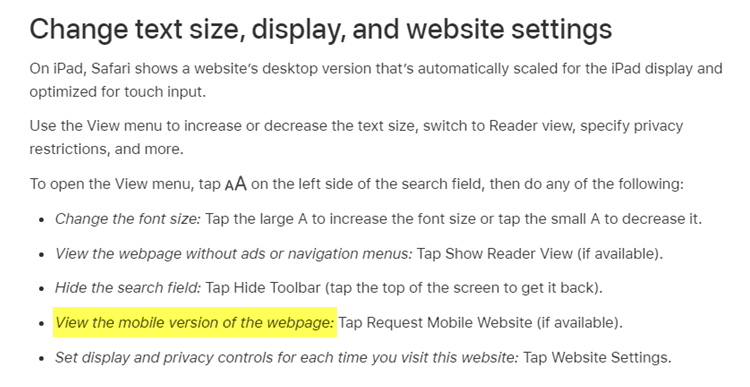
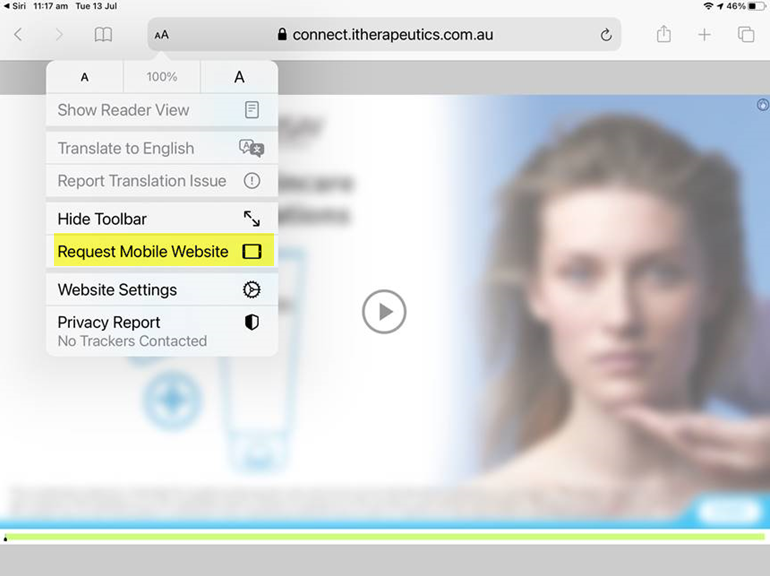
To be able to move an image on a Drag and Drop slide when using an iPad, please adjust the settings in Safari to 'Request Mobile Website' as shown below.